Showing posts with label Student Involvement. Show all posts

Saturday, 4 November 2017

Kahoot - Quizzes that Motivate!


Kahoot is an online quiz generator which allows you to formatively test your class on a range of subjects.

It is easy to used and the process of making quizzes is easy and fast which is why I find this programme more user-friendly than other similar tools.  

You simply make a new quiz and add each question one at a time.  You must generate at least two possible answers but you can have up to four.  These are presented to children as multichoice.  

When making each question you can add pictures, photographs, youtube or video content which can simply be uploaded or taken from a URL.  

When your quiz is ready the teacher logs on and starts the quiz.  This generates a class code which students use to log onto their own device.  This can be a smartphone, ipod, ipad, tablet, chrome, laptop...the compatibility is pretty far and wide! 

Once students have joined the quiz the question will be displayed on a large screen or projector.  Children read the question and then choose the responding colour on their own device to submit their answer.  

There are opportunities to play this as a competitive challenge where the student earn points and complete on a leaderboard.  You can however adjust the game options to suit your group or class.

One of the best things about Kahoot is the shared resource quiz bank which contains quizzes from other teachers on a very large range of topics.  You are able to make a copy really easily and then either use as it or adapt the questions slightly to suit your own context.  You can also link with other teachers in your school to form a community of learners which allows teachers to share resources and assessment tools easily and efficiently.

Personally I think this is a highly motivational tool which lets children understand how a basic game works along with providing them a relevant test or quiz content.  I go on and make quizzes for a fun Friday activity or to consolidate learning on a particular concept.  


Sunday, 15 October 2017

Maths Taster Menu's

I came up with these to help learner's self direct their follow up learning based on their individual needs.  Each of the following Google Drawings has links to both games and how to videos to support learning in a variety of Maths concepts.


The following are two examples of taster menu's which students use to fill their gaps in knowledge.  This has been a really good way to motivate students to understand their own learning.  Students access these 'Taster Menu's' from our team site and can use them as part of their individualised follow up programmes in Maths.  


Some of my more able students are now going on to make their own personalised Google Drawings of Maths Maps with links to specific tasks, games and learning tutorials that support their individual programmes.

Room 15 Reading Slides

My reading planning is again done with the students in mind.  I spend time planning on a format which will be utilised by students via our team Google Site.  

Each group accesses their slides document where each week a new slide is put up with the link to the text and any relevant follow up lessons.  This is used sometime in conjunction with the guided reading text and also is run alongside the Daily 5 which as a team we have come up with to target specific gaps we notice in our children reading.  

This is an example of the group slides for Reading.


Room 15 Writer's Circles

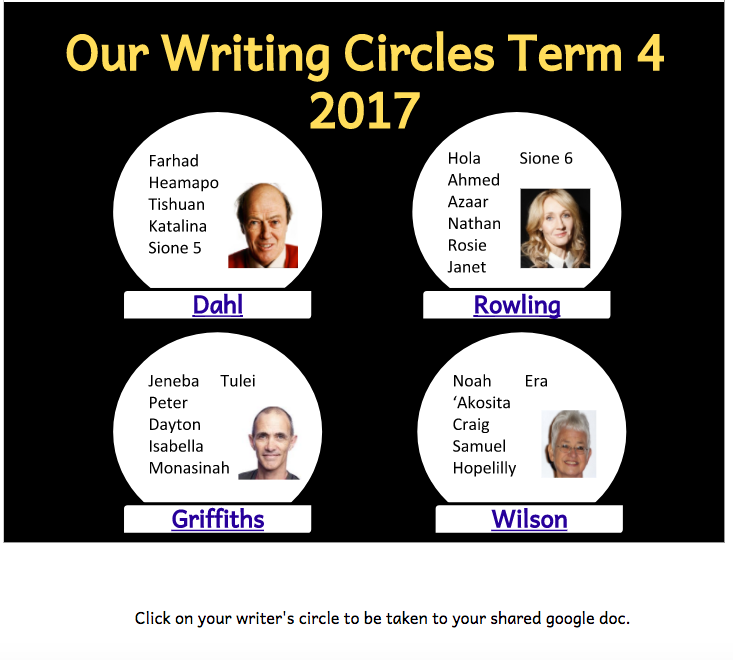
In Writing we are using Google Docs to provide each child with a Writer's Circle.  This is a mixed ability model where the site links each Writer's Circle Doc to the relevant group members.  They all write in a table within the document and this lets them construct their own writing while observing and sharing motivation, ideas and feedback with their group peers.  

Here is how I have set up my Writer's Circle Docs.  They all link back to the site and students can also access them directly from their own Drive folders.  


Tuesday, 10 October 2017

Student Motivation and Learning through Google Sites

This year my team and I have utilised Google Sites to give our students the opportunity to view and be more actively involved in our planning.  

Up until recent years Teacher planning was exactly that... a plan that the teacher primarily used to guide their daily lessons.  It is slowly changing and becoming more relevant to share that documentation with students so that they have increased ownership in what they are learning and also gain understanding into what goes into planning and assessment of the content they are being delivered.

Enter Google Sites... The Mighty Kauri Team

At May Road School we have a team site which has an interface which shows 'buttons' which lead to other curriculum pages.  These buttons were simply made in Google Draw and connected to the relevant hyperlink.  


From this page students can go to the curriculum area they are working on and access their class pages.  These are designed to suit each class and will link to their group docs and planning for the week.  


Maths, Reading and Writing pages all link to classes and then onto groups within classes.  As teachers we are tailoring our pages to suit our students.  This might include specific websites, follow up tasks, reading logs, student voice forms, homework links etc.  

Our planning is kept very simple and I spend time making the docs that the students will utilise rather than working on a single doc that it just to inform me.  Teachers are intelligent people and it often baffles me how much work we are expected to put in to writing down what we will teach.  

Planning smarter for and with students is the way to go.  It gives them ownership and understanding of what they are learning.  It also builds their digital capabilities using tools such as sites and it becomes a working document that is integrates curriculum for enhanced digital learning.


Student voice is possibly the best way to see if what we implemented made any difference.  Through administering my class a Google Form survey there were able to share their reflections about Google Sites and sharing their learning. (excuse some of the spelling)


Sunday, 10 September 2017

Padlet - An Oldie but a Goodie!

Padlet - An Oldie but a Goodie! 

Recently I have been using this tool so much in class to grab student voice quickly and also encourage collaboration between my students.  

This is also a tool I used frequently when presenting at conferences or running staff meetings as it lets people collaborate and share ideas in real time.  It is easy and accessible and generally adults love this way of brainstorming or contributing to a professional discussion or planning session.  

Below is an awesome example of how I recently incorporated this tool into my classroom programme! The answers are cute and well worth a read! 

COPIED FROM Room 15's 2017 Class Blog


Room 15 have been looking at what makes a good ROLE MODEL.  We think that people who do the following make good role models...

- Inspire us to try new things

- Be the best we can
- Do the right thing at the right time
- Follow their dreams
- Do good things for other people and not just for their own interests

We talked about how role models can come in different forms.  They can be people who are close to you such as family and friends.  They can also be people that you admire but have not personally met, like celebrities.  Role models can also show up in many different areas of your life from school, to home, to other activities such as church, sports, after school activities...


This padlet shows some of our thoughts! It is an amazing read and I loved seeing who was named as being a role model within our class and school! 


Made with Padlet

Thursday, 13 April 2017

Coding - Next Generation

It isn't a new thing at all, and lots of schools are starting to pick up on the trend that is CODING. 

The idea is simple...everything that you do online and digitally required some kind of coding sitting in the background driving the programme you are using, making the website function, giving the user prompts as to what to do next...the list goes on.

This video is an easy explanation of Coding and it's importance.


I have had teachers ask me recently what it the point of coding and teaching children about something that only a small proportion of them would do as a job.  This got me thinking... is there a job that our students are going to be doing when their older that wont have any elements of coding and computer programming involved in it? 

The importance of learning how to code is not so that we have a million game designers working in the same field of expertise in 15-20 years time.  It is so that children grow up understanding systems and basic computer science. 

Newton's Third Law - For every action there is an equal and opposite reaction.  How does this relate to coding or computer science?  Well for every action that a person keys into a computer there is code sitting in a start of inertia waiting to be activated.  It then reacts to what message it is being sent or what it is being asked!

Children need to know that what they do on computers happens for a reason and that by understanding why things happen and a little about the how that sits behind computer science, they have the potential to create and innovate beyond the basics!


For teachers who are new to Coding, I suggest signing your class up to the Hour of Code.  It have lots of different integrated modules which get children understanding computer science through game play and design. 

Tuesday, 15 November 2016

Student Leadership Passport

I have designed a Leadership Passport which I am getting students to work on to show their school involvement and participation.

Throughout each term, students are required to set their own goals and show evidence of their digital practise.  Through constructing basic digital badges with children and generating success criteria I have found that they are more motivated to learn new skills linked to using Google Drive, Blogging and Establishing Chromebook Norms.

The idea behind the passport is for students to track their own digital learning and record the progress they are making in terms of Leadership and digital learning.

Tuesday, 26 May 2015

The AMAZING 3D Designers of Room 10

Wow! My week has been amazing and it is only Tuesday! 

My class have embarked on 3D design and printing.  My first task was to figure out how to add my students onto a programme which was R13.  I have an ongoing frustration with web tools and the restrictions the makers put on them, meaning that they are not available for primary school aged children.  I sought advice from many of my new #3DprintchatNZ buddies on Twitter and they suggested that Tinkercad was the best programme to use.  To start with this was a problem due to said restrictions but through a bit of research and some problem solving on my part, I realised that I could sign my class up through Project Ignite.  This programme allows me to monitor my student accounts and also lets me send them lessons where they are stepped through the design process.  


Their first challenge was a pretty basic one.  I wanted them to create a simple name tag which we could make into a keyring or bag tag.  After completing a few Tinkercad lessons at warp speed,  my Year 3 and 4 students embarked on making their names using the shapes and letter tools on Tinkercad.  I expected this process to take them a wee while, as the levels and sizes took me a while to get my head around...can anybody say 'duck to water'??? 

They were so engaged and enthusiastic about the design process.  It was no surprise to me that come Monday, majority of the class returned to school having completed their designs over the weekend.  On Monday we moved the MakerBot Replicator 2 up to Room 10 where is now sits proudly and hasn't stopped printing since being in it's new home!

Children learnt how to complete their designs in Tinkercad and follow the process of uploading to a class Thingiverse account.  They then find their design on my Mac which is connected to the printer and go through the process of printing.  
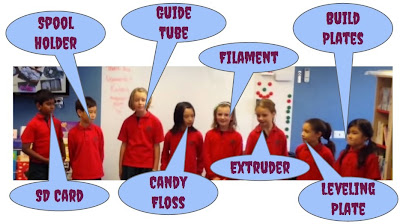
Initially, I had a drama with printing as the SD card had been taken by little fingers when the printer was housed in the library.  I was in a panic as we had guests coming this afternoon to view the printer in action and talk to +Sonya Van Schaijik and I about 3D printing in classrooms and implications for teachers etc.  After putting out a tweet to ask for assistance, I was overwhelmed by @dannydillen and @KiwiMrDee reaching out and offering support, even offering to send a spare SD card my way.  It is so great to have a social media platform like twitter to communicate with people who are more experienced in this field.  Danny suggested that I plug the MakerBot into my computer, I tried it and was printing within 30 minutes.

Most of the children's designs have turned out perfect.  We did have one design which started spooling and making 'candyfloss' which was a disappointment to Max.  We looked upon this 'failure' as a learning experience and as a class we problem solved and figured out where the design had flaws.  Room 10 and Max decided that he hadn't overlapped his joins enough and therefore the letters and details were just sitting on the rectangular platform shape that he has chosen for the base of his keyring.  With Max, I worked with him to change the depth of his details and letters and we then reprinted his design.  We still had initial 'candy-floss' but that was mainly on the raft and therefore the design corrected itself.  


Through Max's designing and printing experience, the whole class has learnt something.  All students had to go back and collaboratively check their designs, thinking about overlapping and talking through the print process with their partner.  We now have 19 more designs in tomorrow's print queue - I am pumped to go to school early tomorrow to get the printer fired up! 


This afternoon, the children were set their second challenge.  In pairs, they had to design a four piece puzzle.  This was something that again, I thought was quite tricky...not for my little clever clogs! They were problem solving and the language that was emerging when they were talking to each other was amazing.  Terms like extruder, spooling, printing plate, levelling, rafts etc are now just normal terms in Room 10's vocabulary. 


Once the base of their puzzle was made, the children decided that they wanted to make the theme around 2D shapes and their properties.  One piece containing the shape, other pieces including the name, sides and corners of each shape.  Once the puzzles are completed we will print and give them to Te Ako Kowhai (our Junior Syndicate) for a maintenance geometry activity.

Lastly, I am loving my students thoughtful reflections on their 3D printing learning journey.  Using Edmodo, they are posting their thoughts including challenges, successes, questions and experiences with each other.  This '3D learning' is really bringing my class together as a group and the collaboration has been nothing short of incredible...and we are only one week in! 


Watch this space - more to come! 


Saturday, 23 May 2015

The Power of Edmodo

Wow - what a past couple of weeks it has been in my class! I have introduced the most wonderful tool to my 7 and 8 year old students +Edmodo.  One could say I have unleashed another monster - everything we do in Room 10 at +Newmarket School becomes a new addiction for my students!

Edmodo is a tool which is a similar platform to the likes of Twitter or Facebook.  Children are all joined up under a class and have their own log on details.  The main page is a live newsfeed which can contain 'notes' or 'alerts'.  Similar to the other social media platforms, Edmodo lets children use the hashtag function to group ideas or conversation topics. 

As a teacher I have added subgroups for my reading and writing programmes so that I can direct specific learning to the children at their level.  This is a great way of differentiating the learning and encouraging group collaboration and reflection.


So how is my wonderful bunch of genius' using this platform? 

Firstly I have been setting 'assignments' each week as part of their reading and writing rotations.  Each group will be set a task related to their learning or level.  

In writing, Room 10 have been looking at simple, compound and complex sentences.  Each group has been set assignments containing motivational pictures related to WW1 (a topic which is still engaging to them despite an intense focus for the past 5 weeks).  The children are then required to reply to the picture with their #simple #compound #complex sentence hashtag.  It is great to see them commenting on each others and identifying the main and subordinate clauses in the comments below each post.  Children have also been maintaining their understanding of figurative language by posting a 140 character alert including a metaphor or simile about different colours - a simple yet really effective task!  In reading, children have been commenting on their weekly reading text and asking questions to further their understanding.  They have also been responding to visual reading texts and audio books which I linked into their reading group via assignments.  This has been a new way of using computers in my literacy rotations and the groups who are on Edmodo each day are beyond motivated.  A collective moan occurs when it is time to rotate to a different activity.


Secondly, my students have been learning how to reflect on their learning.  We have established success criteria for a good reflection.  It must contain both positives and negatives, indicate what you have learnt, anything you found challenging, what you enjoyed and the impact it is having on you as a learner. 

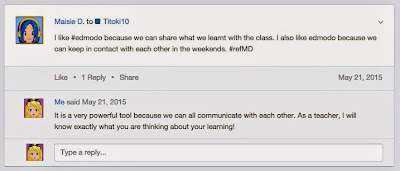
I have seen great reflecting about the classes I take but also it connects me as a teacher to students who are cross grouped into other maths classes.  In just one week, I have been blown away by the thoughts of my Year 3/4 students.  It is so powerful to see such strong student voice coming through and this is really helping me to inform my future practice and planning.  Students are using their own hashtag eg. #refWB to group their reflective posts together.  This will be invaluable later this term at the triadic conferences, as students will be able to share their reflections with their parents, simply by clicking on their hashtag.


Thirdly, individual passion projects are stating to pop up.  Maisie is using the hashtag #mauidolphins to inform and educate the class about this endangered species.  From this, other members of the class are jumping on the bandwagon and creating social action via information websites.  This is not something that I directed in any way - they are taking control of their own learning! One thing Maisie and I have spoken about is the possible use of Google Forms to make a petition that we could send to schools and families to save the Maui Dolphins by putting a stop to netting and trawling.  This is our next step! 


Fourthly, it has made me question the tools I am using in my classroom.  I have a discussion with +Sonya Van Schaijik about the use of our class blog.  It is a good way to communicate with parents and share student work, however with Edmodo it might not be necessary anymore.  When two of my boys figured out how to link their Google Drives with their Edmodo accounts I realised that they could then easily share documents from their Edmodo 'backpack' with their classmates.  This week I am going to experiment with three parents in my class by adding them as parent Edmodo users which will allow them to connect with their child's learning everyday and with the use of the Edmodo app, they can receive live updates to their mobile devices! 

Absolutely amazing tool which has inspired me as a learner, teacher and most importantly, inspired my gorgeous class!